A coding agent for your terminal
Starts in 21 ms.One binary. Every OS.
kon reads, edits, and runs commands in your project until the work is done. It ships as a single 12 MB executable with no runtime, no daemon, and no warm-up, and Windows gets the same native build as macOS and Linux.
$ curl -fsSL https://kon.kitsu.red/install.sh | sh- Startup
- 21 ms
- launch to a finished reply
- Binary
- 12 MB
- about 5 MB to download
- Memory at startup
- 11 MB
- peak resident set
- Native builds
- 6
- Windows, macOS, and Linux on x64 and ARM64
Startup
Faster than you can notice.
From launching the process to streaming back a finished reply, kon takes 21 ms. That’s about one frame on a 60 Hz screen, and a fraction of the 100 ms where a delay starts to register.
No splash screen, no spinner, nothing to wait for. Type kon and it’s there.
- One frame on a 60 Hz display
- 16.7 ms
- kon, launch to a finished reply
- 21 ms
- Where a delay stops feeling instant
- 100 ms
- Reacting to something on screen
- ~250 ms
kon’s time is the startup scenario of make loadtest: process start through one short reply from a local model server, on an Intel i5-8500T running Linux. The 100 ms limit is Jakob Nielsen’s; the reaction time is a typical figure.
Nothing runs that doesn't have to
kon never checks for updates or refreshes its model catalog on launch. Storage migrations read one small version marker instead of scanning your sessions.
Native code, no runtime to boot
kon is compiled Go, statically linked. There is no interpreter to start, no JIT to warm up, and no dependency tree to resolve before the first frame.
Snappy after startup too
Replies stream as they arrive, and redraws are capped at 20 frames a second, so a fast model never outruns your terminal. 50,000 streamed deltas render in 0.67 s.
Milliseconds are tracked
A dependency was quietly building a Unicode table at init. Finding it cut startup from 50 ms to 21 ms, and the load test is there to catch the next one.
PS> Measure-Command { kon --version }$ time kon --versionSingle binary
One file is the whole install.
kon is one statically linked executable: about 12 MB on disk and 5 MB to download. The installer checks its SHA-256, puts it on your PATH, and that’s it. There is nothing else to install, keep running, or keep in sync.
- kon.exeWindows x6412.0 MB
- konLinux x6411.6 MB
- konmacOS Apple silicon11.0 MB
In the binary
- The agent and its full-screen terminal UI
- Four tools:
read,write,edit, andshell - Backends for OpenAI, Anthropic, OpenRouter, Ollama, and any OpenAI-compatible server
- A models.dev catalog snapshot, so
kon modelsworks offline - The user guide, which
kon docsunpacks as plain Markdown - A self-updater that verifies every download:
kon upgrade
Not required
- Node.js, Python, or any other runtime
- A package manager or a global dependency tree
- A background daemon or service
- WSL, Cygwin, or MSYS on Windows
- An account, or a network call at startup
Windows
First-class on Windows, not ported to it.
Terminal tools often treat Windows as an afterthought: install WSL, assume a POSIX shell, hope the paths work out. kon is built for Windows with the same care as macOS and Linux, and it knows which one it’s running on.
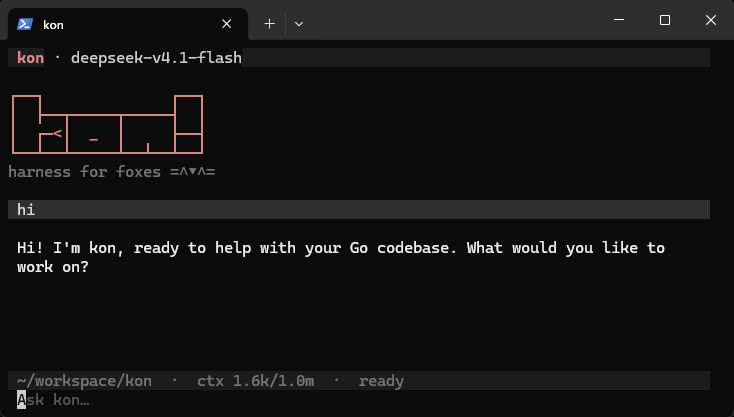
- A native
kon.exe - x64 and ARM64 builds of the same code as every other platform. No WSL, no Cygwin, no emulation layer.
- One-line PowerShell install
iwr … | iexverifies the SHA-256, installs to%LOCALAPPDATA%\Programs\kon, and picks the right architecture, even on older Windows PowerShell.- A shell tool that knows its shell
- Commands run through Git Bash when you have it, then PowerShell, then
cmd.exe, and kon tells the model which one it got, so it writes commands that run. - Windows paths, Windows conventions
- Config lives in
%APPDATA%\konand sessions in%LOCALAPPDATA%\kon, where Windows expects them. - Built around Windows file locking
- Windows locks are mandatory, so each session's lock lives in its own file. A second kon can still preview and follow a live session.
- Upgrades in place
- Windows won't overwrite a running
.exe.kon upgraderenames it aside, swaps in the verified release, and cleans up next time.
Also in the box
Small, not bare.
Four sharp tools
read, write, edit, and shell, after pi's four-tool philosophy. The model spends its context on your code, not on a tool menu.
Sessions are plain files
Every conversation is JSONL you can read, grep, and keep. Pick one back up with kon --resume.
Bring any model
OpenAI, Anthropic, OpenRouter, Groq, xAI, Ollama, or any OpenAI-compatible endpoint. Connect one with /login.
Made for scripts
kon run streams one turn to stdout, so git diff | kon run --stdin review this just works. Add --format json for events.
Steer while it works
Enter steers the running turn the next time kon calls the model. Tab queues a prompt for when the turn is done.
Jobs and subagents
Servers, watchers, and long builds run as background jobs. Ask, and kon hands a self-contained task to a subagent.
Try it. It’s already open.
Run kon in any project. Connect a provider with /login, pick a model with /model, and start typing.
$ curl -fsSL https://kon.kitsu.red/install.sh | sh